Bambu Lab P1S Combo 3D Printer is our pick for the Best 3D Printer for Multi-Color Printing because it offers a reliable, enclosed ecosystem that integrates seamlessly with the AMS for up to 16-color capabilities. This system balances high-speed performance with the structural stability required for complex, multi-material projects.
When selecting a printer for multi-color work, the primary consideration is how the machine manages filament transitions. Systems that use an automatic material system (AMS) or tool-changing mechanisms significantly reduce the manual labor typically associated with color swaps. Buyers should prioritize machines that offer automated purging and flow rate compensation to ensure clean, vibrant results without excessive waste.
Beyond color capacity, the physical build of the printer impacts long-term success. An enclosed chamber is essential for maintaining consistent temperatures when using advanced materials like ABS or ASA, while high-speed motion systems, such as CoreXY, allow for faster production without sacrificing the precision needed for intricate multi-color models.
To achieve the best results with your new machine, it is important to select the Best 3D Printing Filament that matches your specific project requirements. Once you have your printer set up, you may also want to explore the Best 3D Printing Accessories to further streamline your workflow and maintenance.
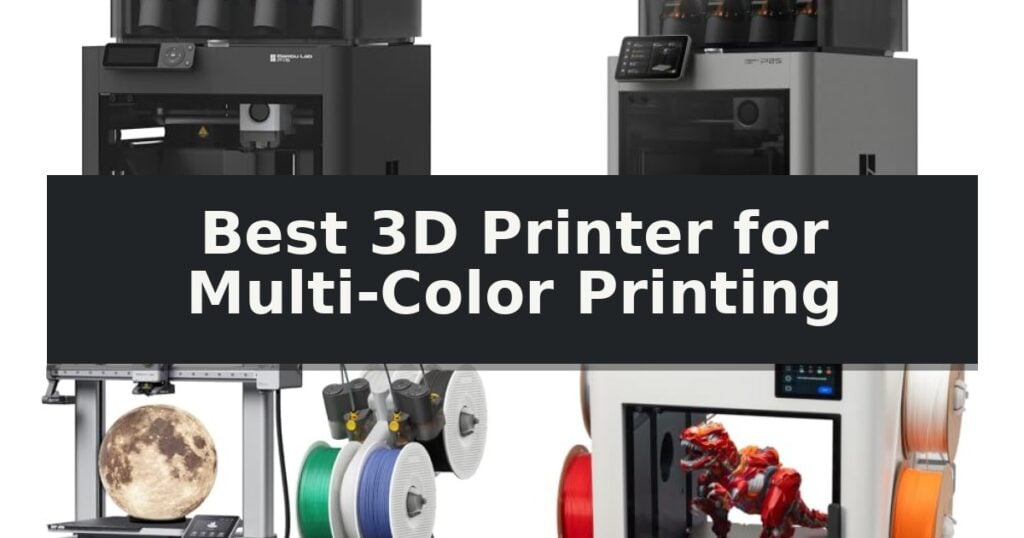
10 Best 3D Printer for Multi-Color Printing in 2026 Reviews
Quick Comparison
| Product | Best For | Key Strength | Score |
|---|---|---|---|
| Bambu Lab P1S Combo 3D Printer | Best Overall | Integrated AMS allows for up to 16-color printing. | 4.9 |
| Bambu Lab P2S Combo 3D Printer | Advanced AI-Powered Multi-Color System | High-speed printing up to 600 mm/s with active flowrate compensation. | 4.6 |
| Bambu Lab A1 Combo 3D Printer | Beginner-Friendly Multi-Color Ecosystem | Full-auto calibration for seamless setup. | 4.3 |
| Snapmaker U1 3D Printer | Fast Tool-Changing Multi-Color Printing | 5-second automatic tool changer for efficient multi-color transitions. | 4.4 |
| Creality K2 Combo 3D Printer | High-Speed 16-Color Capability | 16-color capability via expandable CFS units. | 4.3 |
| Creality K2 Plus Combo 3D Printer | Large Format Multi-Color Production | 16-color printing capability via the intelligent CFS system. | 4.7 |
| Creality K2 SE 4C 3D Printer | Compact Four-Color Desktop Printing | Integrated 4-color printing system requires no complex assembly or external upgrades. | 4.8 |
| Flashforge AD5X 3D Printer | High-Speed Multi-Color CoreXY Performance | Multi-color printing support for up to 4 colors. | 4.8 |
| Creality SPARKX i7 Nano 3D Printer | Space-Saving Multi-Color Automation | Automatic 4-color switching eliminates manual filament changes. | 4.9 |
| Creality SPARKX i7 3D Printer | AI-Enhanced Multi-Color Precision | Integrated AI camera for real-time print monitoring and failure detection. | 4.3 |
How We Chose
To determine the best 3D printer for multi-color printing, we evaluate how each system manages the transition between different materials. An experienced reviewer focuses on the reliability of the filament management unit, the speed of the print head, and the level of automation provided for bed leveling and flow rate calibration to ensure consistent, high-quality results.
- Filament capacity and automated switching efficiency
- Print speed and motion system stability
- Enclosure design and material compatibility
- Calibration automation and first-layer reliability
- Software integration and model library accessibility
1 Bambu Lab P1S Combo 3D Printer — Reliable Enclosed Multi-Color Printing
Achieving vibrant, multi-material prints requires a machine capable of precise coordination between hardware and filament management. The Bambu Lab P1S Combo 3D Printer distinguishes itself through its integrated AMS (Automatic Material System), which enables seamless switching between up to 16 colors or materials during a single print job.
Engineered for efficiency, the printer features a CoreXY motion system that supports high-speed printing up to 500mm/s with 20000 mm/s² acceleration. This performance is balanced by a fully enclosed design, which maintains a stable internal temperature to improve print quality when using advanced filaments like ABS or ASA.
Usability is a core focus, evidenced by the automatic bed leveling system that ensures consistent first-layer adhesion without manual calibration. The setup process is streamlined for quick deployment, with the manufacturer noting a 15-minute assembly time to get users from unboxing to their first print.
While the system is highly capable, it is important to note material limitations. The printer is ideal for PLA, PETG, TPU, and ASA, but it is not recommended for carbon or glass fiber reinforced polymers. This ensures the longevity of the extrusion system while providing a robust platform for creative, multi-color projects.
Best for: Makers and designers who require high-speed, multi-color printing capabilities with a streamlined, user-friendly setup.
Skip if: Users who primarily print with carbon or glass fiber reinforced filaments will find this machine's compatibility limitations restrictive.
- Integrated AMS allows for up to 16-color printing.
- High-speed CoreXY architecture supports rapid production.
- Fully enclosed body enhances performance for advanced materials.
- Automatic bed leveling simplifies the calibration process.
- Not recommended for carbon or glass fiber reinforced polymers.
- AMS unit required for multi-color functionality.
2 Bambu Lab P2S Combo 3D Printer — Advanced AI-Powered Multi-Color System
Achieving vibrant, multi-material prints requires a system that manages both high-speed mechanical movement and precise filament handling. The Bambu Lab P2S Combo 3D Printer integrates the AMS 2 Pro unit to facilitate seamless multi-color and multi-material printing, allowing for complex designs that would otherwise require manual filament swaps.
Engineered for performance, this printer reaches speeds of up to 600 mm/s. It utilizes a PMSM Servo Extruder combined with Active Flowrate Compensation to maintain layer consistency and sharp corners during high-speed operation. The machine is designed for rapid deployment, featuring a 15-minute setup process that includes automatic calibration and quick-swap nozzles.
The included AMS 2 Pro system serves as the core of the multi-color capability, incorporating built-in filament drying at temperatures up to 65 °C to ensure material quality. For environmental control, the Adaptive Airflow System balances cooling and heat retention, supporting a 50 °C chamber temperature for engineering-grade materials while utilizing a carbon filter for air management.
Workflow integration is managed through the Bambu Studio and Bambu Handy software, providing a unified path from model selection on MakerWorld to the final print. AI-driven failure detection is built into the unit to monitor the printing process, providing an automated layer of oversight for complex, long-duration projects.
Best for: Users who require a high-speed, automated workflow for complex multi-color or multi-material 3D printing projects.
Skip if: Users who only require single-material printing and do not need the additional footprint or complexity of the AMS 2 Pro multi-color system.
- High-speed printing up to 600 mm/s with active flowrate compensation.
- Integrated AMS 2 Pro for seamless multi-color and multi-material capabilities.
- Built-in filament drying at up to 65 °C to maintain material integrity.
- AI failure detection and automatic calibration for simplified operation.
- Multi-color printing is strictly limited to the Combo version featuring the AMS 2 Pro.
3 Bambu Lab A1 Combo 3D Printer — Beginner-Friendly Multi-Color Ecosystem
Transforming digital designs into physical, multi-colored objects is the primary function of the Bambu Lab A1 Combo 3D Printer, which integrates the AMS lite system to simplify complex color changes. This printer is designed to handle the intricacies of multi-material extrusion automatically, making it a notable candidate for anyone seeking the Best 3D Printer for Multi-Color Printing without the steep learning curve often associated with manual filament swaps.
Performance is driven by high-speed capabilities, featuring an impressive acceleration of 10,000 mm/s² that maintains precision during rapid movements. To ensure consistent output, the system utilizes active flow rate compensation, which adjusts extrusion in real-time to prevent common printing defects. The inclusion of full-auto calibration removes the need for manual bed leveling and Z-offset adjustments, streamlining the setup process for immediate use.
The user experience is centered around a simplified touchscreen interface and a 1-Clip quick swap nozzle design, which facilitates easier maintenance and nozzle changes. The printer also incorporates active motor noise canceling to reduce operational volume, allowing for a quieter environment during long print jobs. Additionally, the package includes an LED Lamp Kit, enabling users to print and install custom lighting fixtures directly onto their creations.
While the Bambu Lab A1 Combo 3D Printer offers a robust ecosystem, users should note that the multi-color functionality relies specifically on the AMS lite module. This unit is compact enough for most workspaces but requires the dedicated AMS hardware to unlock its full potential for vibrant, multi-material projects.
Best for: Makers and hobbyists who want an automated, beginner-friendly system for creating multi-colored prints and functional decorative lighting projects.
Skip if: Users who require a large-format build volume or those who do not intend to utilize the AMS lite system for multi-color printing.
- Full-auto calibration for seamless setup.
- Integrated AMS lite for reliable multi-color printing.
- Active motor noise canceling for quiet operation.
- High-speed performance with 10,000 mm/s² acceleration.
- Requires AMS lite for multi-color capabilities.
- Specific LED Lamp Kit integration is limited to compatible designs.
4 Snapmaker U1 3D Printer — Fast Tool-Changing Multi-Color Printing
The Snapmaker U1 3D Printer utilizes a sophisticated 4-toolhead system powered by the SnapSwap mechanism to enable true multi-color and multi-material printing. By preloading and preheating four distinct filaments, the unit eliminates the need for manual swaps or time-consuming purging cycles, allowing for rapid transitions between colors and material types in a single print job.
Engineered for efficiency, the printer features an automatic tool changer that completes swaps in just 5 seconds, a significant reduction compared to traditional methods. This design minimizes material waste by up to 5X and supports high-speed production at up to 500 mm/s. The system is built on a rigid CoreXY motion architecture with carbon fiber X-axis rails to maintain stability and dimensional accuracy across its 270 x 270 x 270 mm build volume.
Versatility is a core capability, as the Snapmaker U1 3D Printer handles a wide range of materials including PLA, PVA, TPU, PETG, ABS, and engineering-grade filaments. Users can combine rigid and flexible materials or utilize water-soluble supports for complex geometries. Smart features such as automatic toolhead offset calibration, vibration compensation, and AI-powered print monitoring ensure consistent output with minimal manual intervention.
Designed for accessibility, the system integrates with the Snapmaker Orca open-source slicing software and includes a built-in model library. The interface is managed via a 3.5-inch touchscreen, with additional support for remote app control. The machine is supported by a one-year warranty, providing a comprehensive solution for creators seeking to streamline multi-material workflows.
Best for: Makers and professionals who require high-speed, multi-material printing with minimal material waste and automated tool switching.
Skip if: Users who only require single-material printing or have limited workspace, as the 4-toolhead system and build volume require a larger footprint.
- 5-second automatic tool changer for efficient multi-color transitions.
- 5X faster printing and reduced filament waste compared to traditional purging.
- Wide material compatibility including rigid, flexible, and engineering-grade filaments.
- Smart calibration and AI-powered monitoring for reliable print quality.
- Large physical footprint due to the 4-toolhead system and build volume.
- Complexity of maintenance for the multi-toolhead mechanical system.
5 Creality K2 Combo 3D Printer — High-Speed 16-Color Capability
Achieving vibrant, multi-material prints often requires complex manual intervention, but the Creality K2 Combo 3D Printer streamlines this process through its integrated CFS (Color Filament System). This system enables the use of up to 16 colors by daisy-chaining four units, effectively eliminating the need for post-print painting and manual filament swaps during production.
Engineered for high-speed output, the printer reaches speeds of up to 600mm/s while maintaining structural integrity. The Creality K2 Combo 3D Printer utilizes a robust frame paired with step-servo motors on the extruder and X/Y axes. These motors provide dynamic torque adjustments in under a millisecond, which enhances extrusion consistency and print accuracy while keeping operational noise levels comparable to typing on a laptop.
Usability is a core focus, evidenced by the 95% pre-assembled design that allows for a near plug-and-play experience. The machine includes a Smart AI Camera for real-time monitoring of potential failures like spaghetti tangles or idling, and it features an advanced auto-leveling system that specifically probes the target print area for increased precision. With a build volume of 260 x 260 x 260 mm, it accommodates a wide range of materials including PLA, PETG, ABS, and carbon-fiber-reinforced filaments.
While the Creality K2 Combo 3D Printer offers advanced automation, users should note that the full 16-color capability requires the purchase of additional CFS units, as the base combo includes one. The system is designed to balance high-speed performance with quiet operation, making it a versatile tool for those requiring complex multi-color output without the traditional overhead of manual color management.
Best for: Makers and designers who require high-speed, multi-color 3D printing with automated material management.
Skip if: Users who only require single-color printing or those who do not have the space for the CFS unit and the 260mm build volume.
- 16-color capability via expandable CFS units.
- High-speed printing up to 600mm/s.
- Step-servo motors for precise torque and quiet operation.
- Smart AI monitoring for real-time print failure detection.
- Additional CFS units must be purchased separately to reach the 16-color maximum.
- Fixed build volume may limit larger-scale projects.
6 Creality K2 Plus Combo 3D Printer — Large Format Multi-Color Production
The Creality K2 Plus Combo 3D Printer differentiates itself through its integrated CFS (Color Filament System), which enables sophisticated multi-color printing by automatically selecting, switching, and relaying filaments. This flagship system supports up to 16 colors when four units are daisy-chained, effectively eliminating the need for post-print painting.
Designed for high-volume and large-scale projects, this printer features an expansive 350x350x350mm build volume. It utilizes industry-grade FOC step-servo motors on the XYZ axes to achieve print speeds of up to 600mm/s with an acceleration of 30,000mm/s². The machine is built on a rigid Matrix frame structure using aerospace-grade aluminum alloy, which is engineered to minimize resonance and deformation during high-speed operation.
Thermal management and precision are central to its design. The chamber maintains a constant temperature of up to 60°C, facilitating the use of demanding materials like ASA and PPA, while the high-temp nozzle supports temperatures up to 350°C. To ensure reliability, the unit incorporates dual AI cameras—one for monitoring print failures like spaghetti detection and another for real-time flow rate optimization—alongside 18 smart sensors.
Mechanical stability is further enhanced by a dual Z-axis system supported by four linear rods, which ensures consistent bed movement. The system automates critical setup tasks, including auto-adjusting bed tilt and leveling, providing a streamlined workflow for users handling complex engineering filaments or large-batch production.
Best for: Users requiring large-format, high-speed, multi-color production with advanced material compatibility.
Skip if: Users with limited workspace who do not require a 350mm build volume or multi-color capabilities.
- 16-color printing capability via the intelligent CFS system.
- Large 350x350x350mm build volume for oversized or batch prints.
- High-speed performance reaching 600mm/s with 30,000mm/s² acceleration.
- Advanced material support including high-temp filaments like PPA and ASA.
- Dual AI camera monitoring for automated failure detection and flow optimization.
- Large physical footprint requires significant dedicated workspace.
- Complex multi-component system may involve a steeper learning curve for maintenance.
7 Creality K2 SE 4C 3D Printer — Compact Four-Color Desktop Printing
Achieving vibrant, multi-material designs no longer requires complex hardware modifications or external add-ons. The Creality K2 SE 4C 3D Printer integrates 4-Color Multicolor 3D Printing directly into its chassis, allowing users to produce intricate, multi-hued models right out of the box.
Engineered for efficiency, the printer utilizes an advanced CoreXY Motion System to reach print speeds of up to 500mm/s with 20,000mm/s² acceleration. This high-speed capability is supported by a rigid all-metal frame that minimizes vibration, ensuring that fast print jobs maintain high accuracy and consistent detail.
Reliability is central to the design, featuring Intelligent Auto Bed Leveling that probes the active print area to guarantee a perfect first layer without manual intervention. To protect long-duration projects, the system includes Filament Runout Sensor, Filament Tangle Detection, and Power Loss Recovery, which collectively mitigate the risk of failed prints and wasted material.
Designed for both accessibility and depth, the machine offers a Ready-to-Print setup for beginners while providing advanced users with Root Access, Creality OS, and Fluidd UI for deep customization. Its compact footprint occupies 37% less space than traditional multi-color systems, making it a practical choice for home offices and educational makerspaces.
Best for: Makers and hobbyists who require a compact, integrated solution for multi-color printing without the need for complex external hardware upgrades.
Skip if: Users who require a larger build volume than the 220×215×245mm capacity provided by this unit.
- Integrated 4-color printing system requires no complex assembly or external upgrades.
- High-speed CoreXY motion enables print speeds up to 500mm/s.
- Intelligent protection features include filament tangle detection and power loss recovery.
- Compact design saves 37% more space compared to traditional multi-color setups.
- Fixed build volume of 220×215×245mm may limit large-scale projects.
8 Flashforge AD5X 3D Printer — High-Speed Multi-Color CoreXY Performance
Achieving precise color transitions in additive manufacturing often requires complex hardware, but the Flashforge AD5X 3D Printer simplifies this process with integrated support for up to 4 colors simultaneously. This machine is built on a high-performance CoreXY structure, enabling rapid production with print speeds reaching 600mm/s and acceleration up to 20,000mm/s².
Beyond its multi-color capabilities, the printer prioritizes reliability and ease of use through its 1-Click Auto Leveling system, which manages bed calibration automatically. The unit features a 300°C direct-drive extruder, providing the thermal headroom necessary for various filament types, while an advanced dual-channel cooling fan and vibration compensation system work to maintain structural integrity during high-speed operations.
Versatility is a core design element, as the system supports four distinct nozzle sizes ranging from 0.25mm to 0.8mm. Users can swap to the 0.25mm nozzle for intricate, miniature-scale details or utilize the 0.6mm and 0.8mm options to significantly reduce print times for larger, robust models. The pre-installed 0.4mm nozzle serves as a balanced baseline for everyday projects.
Operational convenience is enhanced by smart features including automatic filament feeding and retraction, alongside a resume printing function that protects progress during unexpected power interruptions. For remote management, the Flash Maker mobile app allows users to monitor and control their print jobs from outside the immediate workspace.
Best for: Makers and prototyping professionals who require high-speed, multi-color output with automated calibration and remote monitoring capabilities.
Skip if: Users who require a build volume larger than 220x220x220mm or those who do not have a need for multi-color material management.
- Multi-color printing support for up to 4 colors.
- High-speed CoreXY architecture capable of 600mm/s.
- 1-Click Auto Leveling for simplified bed calibration.
- Versatile nozzle compatibility from 0.25mm to 0.8mm.
- Fixed build volume of 220x220x220mm may limit large-scale projects.
9 Creality SPARKX i7 Nano 3D Printer — Space-Saving Multi-Color Automation
Transitioning from single-color prototypes to vibrant, multi-material models requires a system that manages filament swaps without constant oversight. The Creality SPARKX i7 Nano Combo 3D Printer addresses this by integrating a dedicated multi-color system that supports automatic switching for up to 4 colors, effectively removing the need for manual intervention during complex print jobs.
Engineered for both efficiency and space management, this unit features a compact footprint that fits easily on standard desks while maintaining a generous 260×260×255mm build volume. This capacity allows users to scale from small, intricate miniatures to larger functional items like airless basketballs without needing to swap hardware.
Reliability during long-duration prints is supported by real-time filament monitoring across all channels. The system includes empty run detection that automatically halts the printer if it senses breakage, tangling, or feed issues, which helps prevent wasted material and failed prints. Furthermore, the auto filament refill feature ensures that the printer switches to a backup spool seamlessly when the current one is depleted.
Usability is enhanced through auto feed and retract functionality, which automates the loading and unloading process. This design choice simplifies daily maintenance, allowing users to replace spools without performing manual extruder operations. With its pre-assembled construction and integrated auto-leveling, the machine is designed to minimize setup time for immediate operation.
Best for: Makers who require a space-efficient, automated solution for multi-color printing and long-duration projects.
Skip if: Users who require a significantly larger build volume than 260x260x255mm or those who prefer a non-integrated, modular filament system.
- Automatic 4-color switching eliminates manual filament changes.
- Real-time monitoring with empty run detection prevents print failures.
- Compact design optimizes desktop workspace.
- Auto feed and retract simplifies spool management.
- Fixed build volume may limit extremely large-scale projects.
- Integrated system requires specific compatibility with the included CFS Nano unit.
10 Creality SPARKX i7 3D Printer — AI-Enhanced Multi-Color Precision
The Creality SPARKX i7 3D Printer streamlines the transition from digital design to physical object by utilizing an integrated AI camera that monitors for common print failures like spaghetti formation and entanglement. This intelligent system provides real-time alerts, allowing for more reliable unattended operation during long-duration projects.
Engineered for efficiency, this model features an advanced multicolor printing capability that, when paired with the CFS (Creality Filament System), reduces purging waste by 50%. This design choice not only conserves material but also improves overall printing productivity by 15%, making it a practical choice for users focused on high-volume or complex multi-material output.
The printer prioritizes ease of use with fully automatic pre-print calibration, which handles bed leveling, nozzle Z-offset, and input shaping without manual intervention. Users can rely on Pressure Advance technology to minimize oozing at corners and Input Shaping to mitigate vibrations, ensuring cleaner surface finishes and sharper geometric edges.
With a generous 260×260×255mm build volume, the unit accommodates a wide range of project sizes. For late-night workflows, the Ultra-Quiet Night Mode allows for near-silent operation, while the programmable RGB light bar provides immediate visual feedback on the current print status.
Best for: Users who require automated, high-efficiency multicolor printing with integrated AI monitoring for complex projects.
Skip if: Users who do not have the CFS (Creality Filament System) accessory, as the multicolor printing capabilities are not functional without it.
- Integrated AI camera for real-time print monitoring and failure detection.
- Fully automatic calibration including bed leveling and input shaping.
- Reduced purging waste by 50% for more economical filament usage.
- Large build volume of 260×260×255mm for versatile project sizing.
- Ultra-quiet operation mode suitable for overnight printing.
- Multicolor printing requires the additional purchase of the CFS (Creality Filament System).
Best 3D Printer for Multi-Color Printing Buying Guide
Filament Management Systems
The core of multi-color printing lies in the filament management system. Whether using an AMS or a tool-changer, the printer must reliably feed, retract, and switch between different spools without causing jams or tangles.
Look for systems that provide real-time monitoring and automatic refill capabilities. These features ensure that if one spool runs out, the printer can seamlessly transition to a backup, preventing print failures during long, multi-color jobs.
Speed and Motion Architecture
Multi-color prints often involve hundreds of filament changes, which can significantly increase total print time. A CoreXY motion system is generally preferred for its ability to maintain high speeds and acceleration while keeping the print head stable.
High-speed printing is only beneficial if the machine maintains precision. Features like vibration compensation and active flow rate control are critical to ensure that the increased speed does not result in ringing or poor layer adhesion.
Enclosure and Material Versatility
An enclosed printer is vital for those looking to print with engineering-grade filaments. By maintaining a stable chamber temperature, the enclosure prevents warping and improves the structural integrity of the final model.
Consider the maximum nozzle temperature of the printer. A higher temperature range allows for greater flexibility, enabling you to use a wider variety of materials beyond standard PLA, such as PETG, ASA, or carbon-fiber-reinforced polymers.
Automation and Calibration
Modern multi-color printers should handle the heavy lifting of calibration. Automatic bed leveling and Z-offset adjustment are non-negotiable for achieving a perfect first layer, which is the foundation of any successful print.
Advanced sensors, such as AI-powered cameras, can monitor for common failures like spaghetti prints or nozzle clogs. These tools provide peace of mind, especially when running long prints that require minimal human intervention.
Software and Workflow Integration
The software ecosystem is just as important as the hardware. A well-integrated slicer that automatically calculates purge volumes and manages color assignments simplifies the complex process of preparing multi-color files.
Check for compatibility with cloud-based model libraries and remote monitoring apps. Being able to start, stop, and observe your prints from a mobile device adds a layer of convenience that is essential for modern, high-productivity workflows.
Frequently Asked Questions
Do I need a special slicer for multi-color printing?
Most multi-color printers come with or support proprietary slicing software designed to manage filament swaps, purge towers, and color assignments automatically.
How much filament is wasted during multi-color printing?
Waste occurs during the purging process when the nozzle clears the previous color. Some newer systems use advanced algorithms to minimize this waste, but it remains a factor to consider for large projects.
Can I use any filament brand with these printers?
While many printers are compatible with standard 1.75mm filaments, some systems perform best with specific brands or RFID-tagged spools that communicate material settings to the printer automatically.
Is an enclosed printer necessary for all multi-color prints?
An enclosure is primarily needed for materials prone to warping, like ABS or ASA. If you only print with PLA, an open-frame system may be sufficient.
How long does it take to set up a multi-color printer?
Most modern combo units are designed for quick assembly, often taking 15 to 30 minutes to go from unboxing to your first print, thanks to pre-assembled components and automated calibration.
Conclusion: Our Top Pick
Our top pick is Bambu Lab P1S Combo 3D Printer. Choosing the right multi-color 3D printer depends on your specific production needs, whether you are creating decorative models or functional engineering parts. Prioritize systems that offer robust filament management and high-speed motion to ensure your projects are both efficient and visually striking.
By focusing on machines with integrated automation and reliable enclosure designs, you can significantly improve your success rate. Evaluate the software workflow and material compatibility to ensure the printer aligns with your long-term creative goals.